
EpicCare Link
Epic: Electronic Health Record System
UVM Health uses Epic, the industry standard electronic health record (EHR) system. More than 200 million patients nation-wide have current electronic records in Epic. The system allows users to exchange medical records with any Epic customer across the world as well as with other non-Epic EHRs to provide current, up-to-date information on our patients to promote excellent patient care.
EpicCare Link
EpicCare Link is an online portal that securely connects you with your patients' information, giving you real-time updates on their care. Medical providers, like you, will be able to see treatment information (such as lab and test results, consultation notes and discharge summaries) and send messages to providers in one convenient, easy-to-access place. EpiceCare Link is not an EHR solution; it is a web-based, read-only application.
If you have an account, click below to log in.
Benefits of EpicCare Link
- Promote continuity of care and review your patients' treatment and progress at UVM Health sites
- View your patient's medical records
- Get notified of patient treatment updates, such as hospital admission or discharge
How to Access
If your site is currently on EpicCare Link, speak to your Site Administrator for access. If your site is not currently in EpicCare Link, the practice manager (or equivalent) should email EpicCare Link Support at EpicCareLinkSupport@uvmhealth.org to request access.
Requests for access will be evaluated by our team. New sites and users must be approved and complete training before access will be granted. Please note this process is multi-step and takes time to complete.
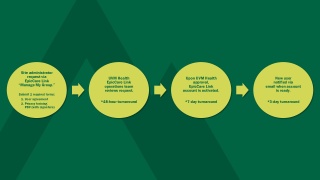
What to Expect During Your EpicCare Access Process
Accessing EpicCare Link
If you have an account, click below to log in.
If you need access to EpicCare Link or have questions, please email EpicCare Link Support at EpicCareLinkSupport@uvmhealth.org.
EpicCare Link Resources
Frequently Asked Questions
If you are a new site, the practice manager or office manager should reach email EpicCare Link Support at EpicCareLinkSupport@uvmhealth.org. They will need to verify title, practice address, phone number and then ask for information to fill out a request and start this process.
If your practice already uses EpicCare Link, you will need to reach out to your site administrator so they can complete an access request.
Please note the times listed in our Workflow section. If it is within those times, please be patient with our teams. If it is outside those times, please email EpicCare Link Support at EpicCareLinkSupport@uvmhealth.org.
When the new request has been completed by UVM Health and the account is active, the new user will receive an email confirmation with next steps. Your Site Administrator can assist with creating your initial temporary password. Or you may contact our support center at EpicCareLinkSupport@uvmhealth.org.
We accept DocuSign signatures, pdf digital signatures or a scanned copy of the original document with signature.
Your site administrator is your local resource, please see them first for any questions. If the site administrator cannot answer, they can reach out on behalf of staff to our EpicCare Link Support at EpicCareLinkSupport@uvmhealth.org.